

GatePass settings
Set sign-in and session rules for GatePass users, the extension policy, what's logged and for how long, the notice people see, and alerts.
GatePass › Settings holds organization-wide rules for sign-in, the extension, logging and alerts. They're available once GatePass is set up.
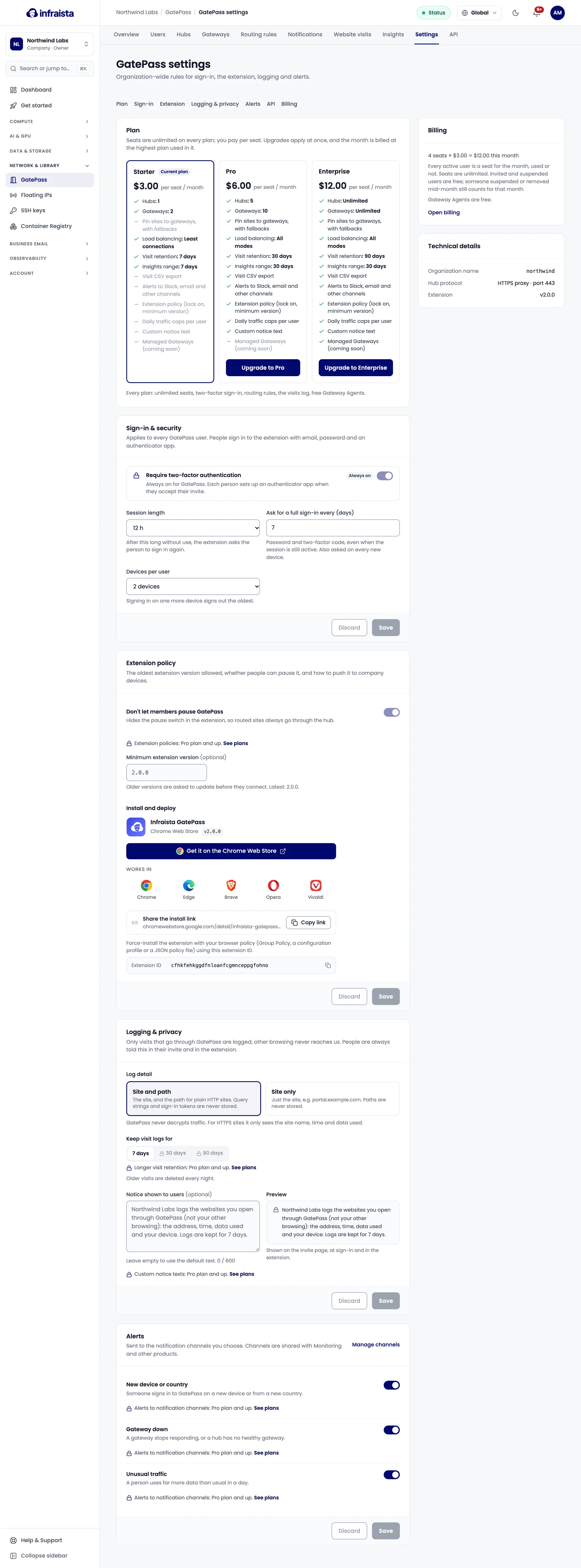
Sign-in & security
Two-factor authentication is always on for GatePass. Each person sets up an authenticator app when they accept their invite. You can set:
- Session length: after this long without use, the extension asks the person to sign in again;
- Ask for a full sign-in every (days) (1–30): password and code, even when the session is still active. Also asked on every new device;
- Devices per user: signing in on one more device signs out the oldest.
Extension policy
Pro and Enterprise:
- Don't let members pause GatePass: hides the pause switch, so routed sites always go through the hub;
- Minimum extension version: older versions are asked to update before they connect.
Install and deploy shows the Extension ID to force-install the extension with your browser policy (Group Policy, a configuration profile or a JSON policy file).
Logging & privacy
Only visits that go through GatePass are logged; other browsing never reaches us. People are always told this in their invite and in the extension.
- Log detail: Site and path (the path for plain HTTP sites only; query strings and sign-in tokens are never stored) or Site only.
- Keep visit logs for: 7 days on Starter, up to 30 on Pro and up to 90 on Enterprise. Older visits are deleted every night.
- Notice shown to users (Pro and Enterprise): replace the default text shown on the invite page, at sign-in and in the extension.
Alerts
Choose who hears about:
- someone signing in to GatePass on a new device or from a new country;
- a gateway that stops responding, or a hub with no healthy gateway;
- a person using far more data than usual in a day.
Sending alerts to notification channels (Slack, email and others shared with other products) needs Pro or Enterprise.