

Secrets and variables
Store API keys, passwords and settings for your pipelines per organization, pipeline or environment, use them in the file, and edit them as a .env file.
Secrets hold sensitive values (passwords, API keys, tokens): they're encrypted, masked as *** in
logs, and can't be viewed after saving. Variables hold plain settings (APP_ENV, LOG_LEVEL) and
are shown in the console and in logs.
Scopes
| Scope | Set on | Reaches |
|---|---|---|
| Organization | Secrets & variables, organization tab | Every pipeline |
| Pipeline | The pipeline's Secrets & variables tab | Every job of that pipeline |
| Environment | The same tab, for one environment (production, staging…) | Only jobs with environment: <name> |
When the same name is set at several scopes, the most specific wins: environment, then pipeline, then organization.
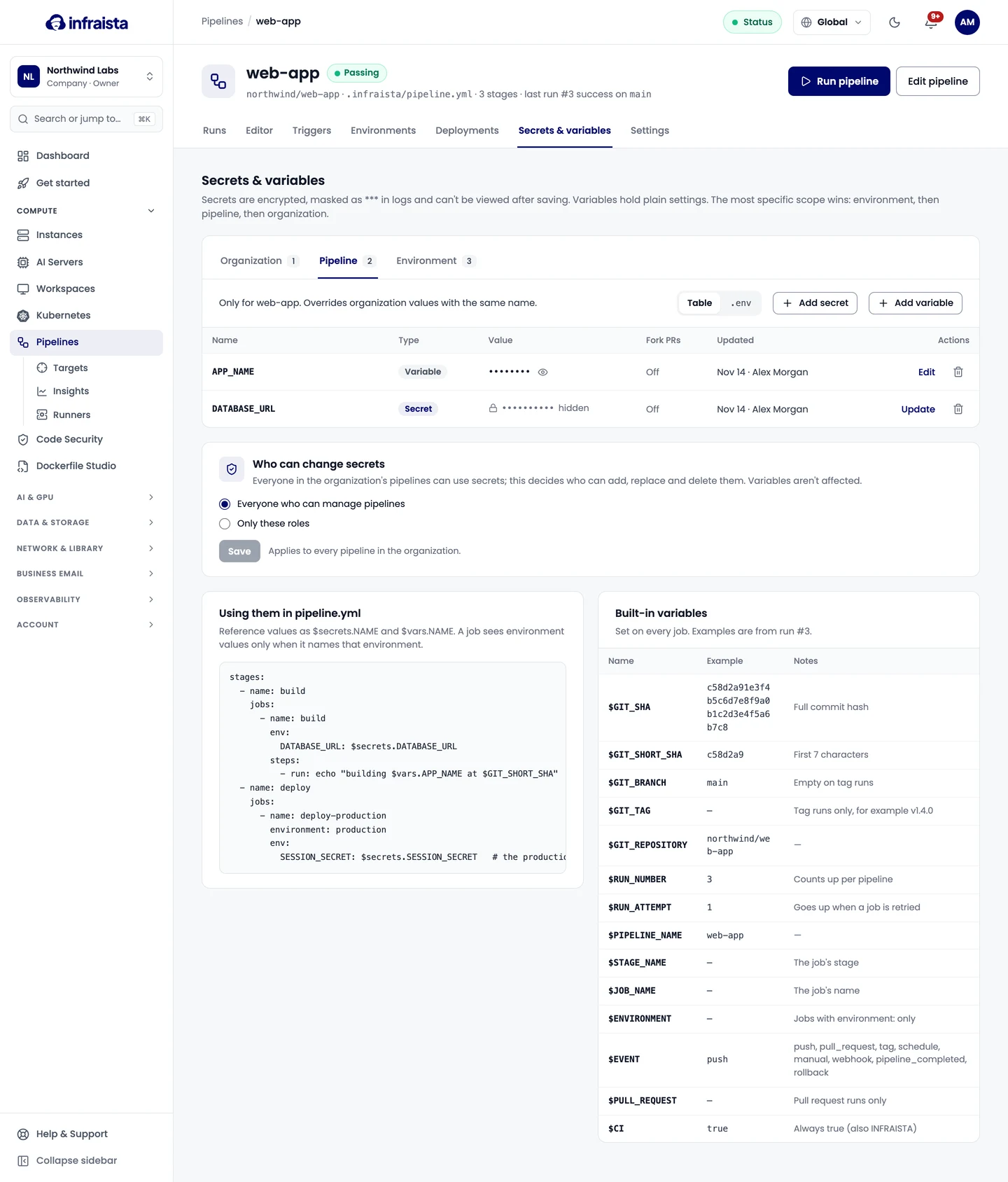
Add a secret or variable
- Open the pipeline's Secrets & variables tab.
- Add a secret or a variable, give it a name and value, and choose its scope.
- Save. A secret is encrypted when you save; afterwards it can only be replaced, never shown.
Available to pull requests from forks is off by default: anyone who opens a fork pull request could print a value that's available to it.
Use them in the pipeline file
jobs:
  - name: migrate
    environment: production
    steps:
      - run: ./migrate.sh "$DATABASE_URL"
        env:
          DATABASE_URL: $secrets.DATABASE_URL
APP_ENV: $vars.APP_ENV- In
run:commands andenv:, a secret is passed as a shell variable, so its value never appears on the command line. - In an action's
with:, the value is filled in and masked in the log. - A job sees environment values only when it names that environment.
- A name that isn't set gives an empty value and a warning in the job's set-up log.
Built-in variables such as $GIT_SHA are listed in the
file reference.
Give your containers their environment
infraista/deploy-docker with env_from: pipeline passes the job's secrets and variables to the
containers as their environment, with no .env file left on the server. The job's environment:
decides which environment's values apply. Values with line breaks are left out, and the log names them.
For values your app reads while it's built (such as NEXT_PUBLIC_*), use env_from: pipeline on
docker-build-push instead: only variables are passed, never secrets. See
Images.
Edit a whole scope as a .env file
Switch View from Table to .env to edit a scope as one file: one NAME=value per line,
with export, # comments and quotes understood. A name given twice keeps the last value.
- New names become decides how new names are saved: detected (names containing PASSWORD, SECRET, TOKEN, KEY and the like, and values that look like keys or URLs with a password, become secrets; the rest variables), or all secrets, or all variables.
- Secrets show as
********; a line still showing that keeps the secret as it is. - Remove names this file leaves out deletes values that aren't in the file.
- Preview changes shows what would be added, changed, removed and kept. Click a name in the preview to switch it between secret and variable. Nothing is saved until you press Save .env.
Who can change secrets
By default everyone who can manage pipelines can add, replace and delete secrets. Under Who can change secrets, choose Only these roles to limit that to certain roles (Owners always can). The setting applies to every pipeline in the organization. Everyone can still use secrets in pipelines and change variables.
Related
Triggers
Start pipeline runs on pushes, pull requests, tags, a schedule, by hand with inputs, from another system's webhook, or when another pipeline finishes.
Environments and deployments
Protect production with approvals, allowed branches, wait timers and deploy windows, see every deployment, and roll an environment back to an earlier run.