

Sub-accounts
Give a person or a backup tool its own storage box login, locked to one folder, read-only or read-write, with its own protocols, SSH key and panel access.
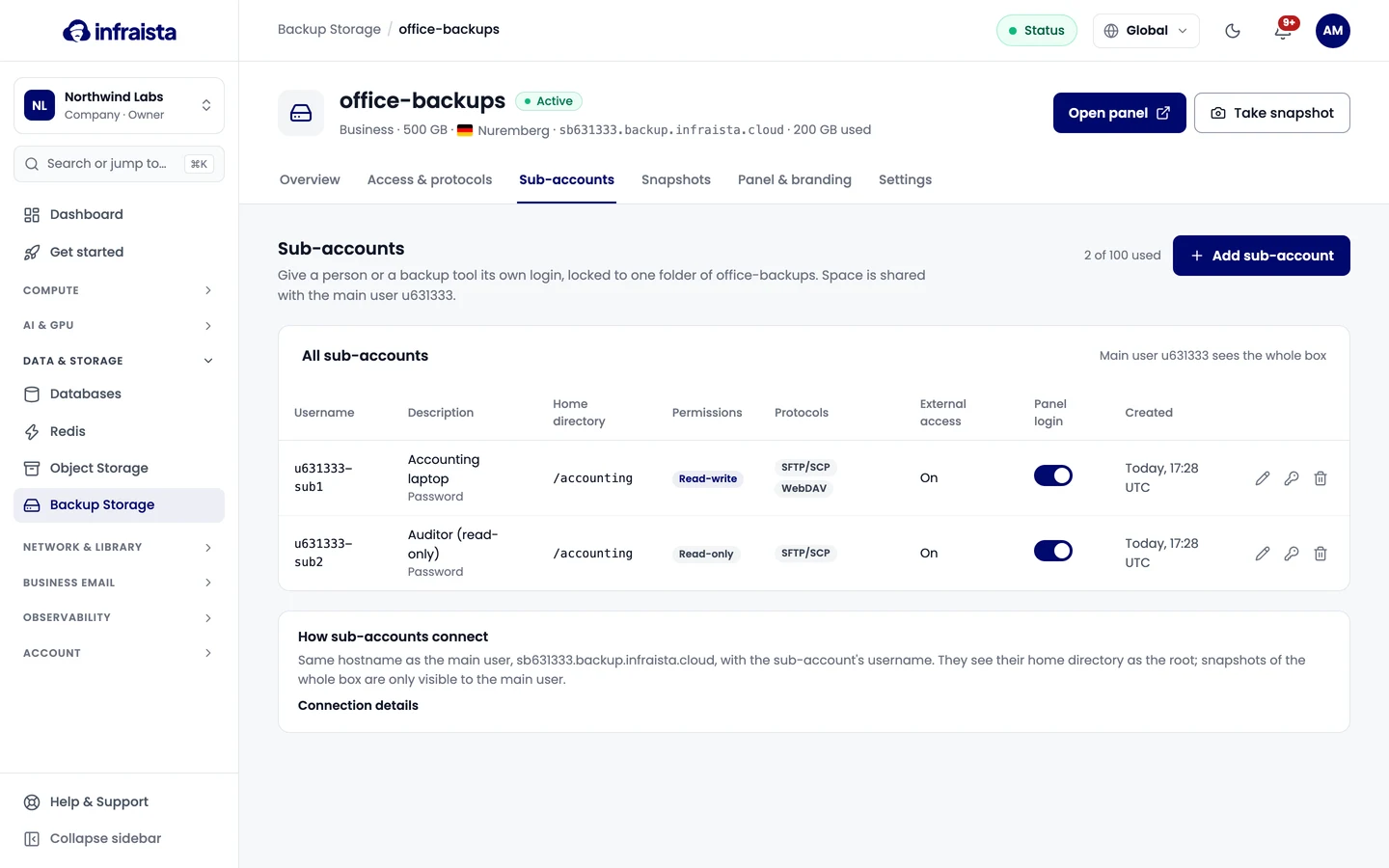
A sub-account is a separate login for a storage box, locked to one folder. Give one to each person, client or backup tool, so you can change or remove one without touching the others. Sub-accounts share the box's space with the main user. A box can have up to 100.
Add a sub-account
- Open the box and select Sub-accounts, then Add sub-account.
- Fill in:
- Description: shown in the console and the panel, for example "Accounting laptop";
- Home directory: the folder the sub-account sees as its root, like
/clients/acme. It's created if it doesn't exist; - Protocols it may use (only those turned on for the box);
- SSH public key (optional), for SFTP, rsync and BorgBackup without a password;
- Read-only (list and download only, good for clients and auditors) or Read-write;
- External access: reachable from the internet, still limited to the box's allowlist. Off means only from your Infraista private network;
- Allow panel login: lets it sign in to the web panel to browse, upload and restore files in its home directory.
- Select Create sub-account.
The username is the box's username plus a suffix, for example u100001-sub1. The password is shown
once: copy it now.
How sub-accounts connect
Same host name as the main user, with the sub-account's username. They see their home directory as the root. Snapshots of the whole box are only visible to the main user.
Change, reset or remove
From the sub-account's row:
- Edit changes its description, home directory, protocols, permissions and access. Changing the home directory doesn't move files; the sub-account sees the new folder from its next connection.
- Reset password makes a new password; the old one stops working right away. SSH keys keep working.
- Delete removes the login and closes its connections. Files in its home directory stay on the box.
Related
Back up with rsync, BorgBackup and restic
Send scheduled backups to a storage box with rsync over SSH, deduplicated and encrypted BorgBackup repositories, or restic over SFTP, with ready-to-run commands.
Snapshots and restores
Protect a storage box with automatic and manual snapshots, restore single files from the web panel, or roll the whole box back to an earlier point in time.