

Snapshots and restores
Protect a storage box with automatic and manual snapshots, restore single files from the web panel, or roll the whole box back to an earlier point in time.
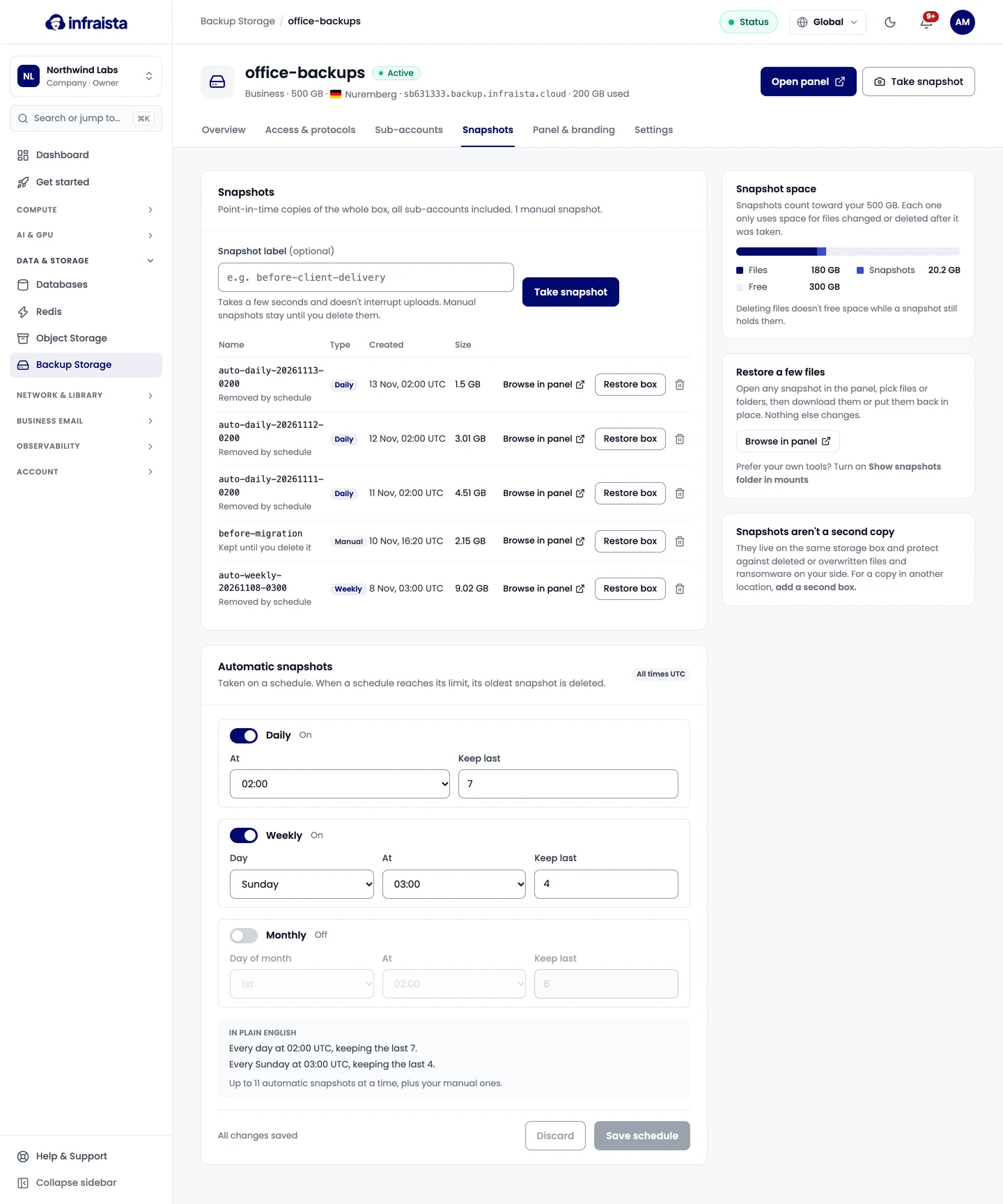
A snapshot is a read-only, point-in-time copy of the whole box, sub-accounts included. Taking one takes a few seconds and doesn't interrupt uploads. Each snapshot only uses space for files changed or deleted after it was taken.
Open the box and select Snapshots.
Automatic snapshots
Under Automatic snapshots, turn on any of the schedules (all times UTC):
- Daily: at a time, keeping the last n;
- Weekly: on a day and time, keeping the last n;
- Monthly: on a day of the month (1 to 28) and time, keeping the last n.
In plain English repeats what you set. When a schedule reaches its limit, its oldest snapshot is deleted. A box keeps up to 60 automatic snapshots in total. Select Save schedule.
Take a snapshot now
Select Take snapshot (on the box's header), enter a Snapshot label such as before-client-delivery,
and confirm. Manual snapshots stay until you delete them. Take one before big changes, like a cleanup or a
new backup job.
Restore a few files
Open any snapshot in the web panel (Browse in panel), pick files or folders, then download them or put them back in place. Nothing else changes.
Prefer your own tools? On Settings › Advanced, turn on Show snapshots folder in mounts: a read-only snapshots folder appears at the root over SFTP and rsync, for the main user only.
Roll back the whole box
Restore box on a snapshot returns every folder, all sub-accounts included, to how it was then:
- everything written since is permanently deleted;
- snapshots newer than this one are deleted too;
- connections drop during the rollback, and backup jobs that run meanwhile fail.
Type the box's name to confirm. It usually takes a few minutes. Only need a few files back? Restore them from the panel instead.
Snapshot space
Snapshots count toward your box's space. Deleting files doesn't free space while a snapshot still holds them; delete old snapshots to free it. Snapshot space on the tab shows the split between files, snapshots and free space.
Related
Sub-accounts
Give a person or a backup tool its own storage box login, locked to one folder, read-only or read-write, with its own protocols, SSH key and panel access.
Web panel
Give your team and sub-accounts a browser panel to browse, upload and restore files, and on Agency and Reseller plans brand it with your logo, domain and email sender.