

API, webhooks and CI
Gate deploys on Code Security results in Infraista Pipelines or any other CI, read scans and reports through the API, and get signed webhooks.
Code Security > API, webhooks & CI has everything to use Code Security from your own tools.
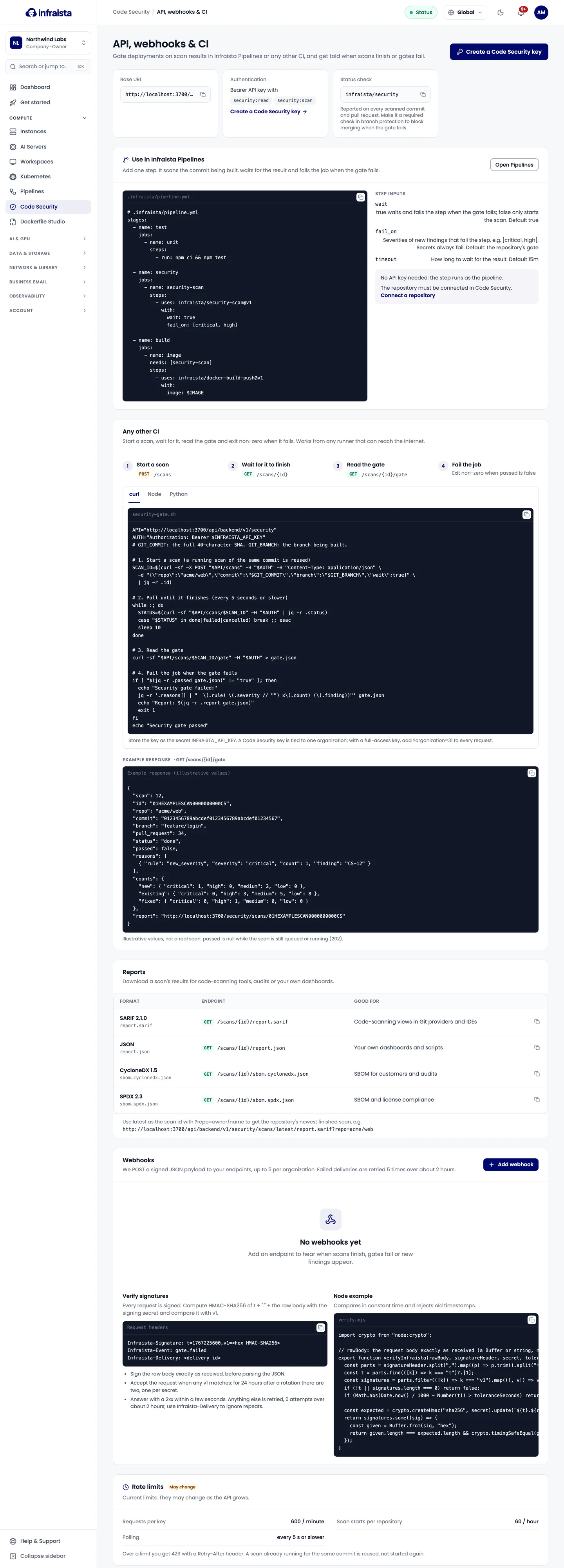
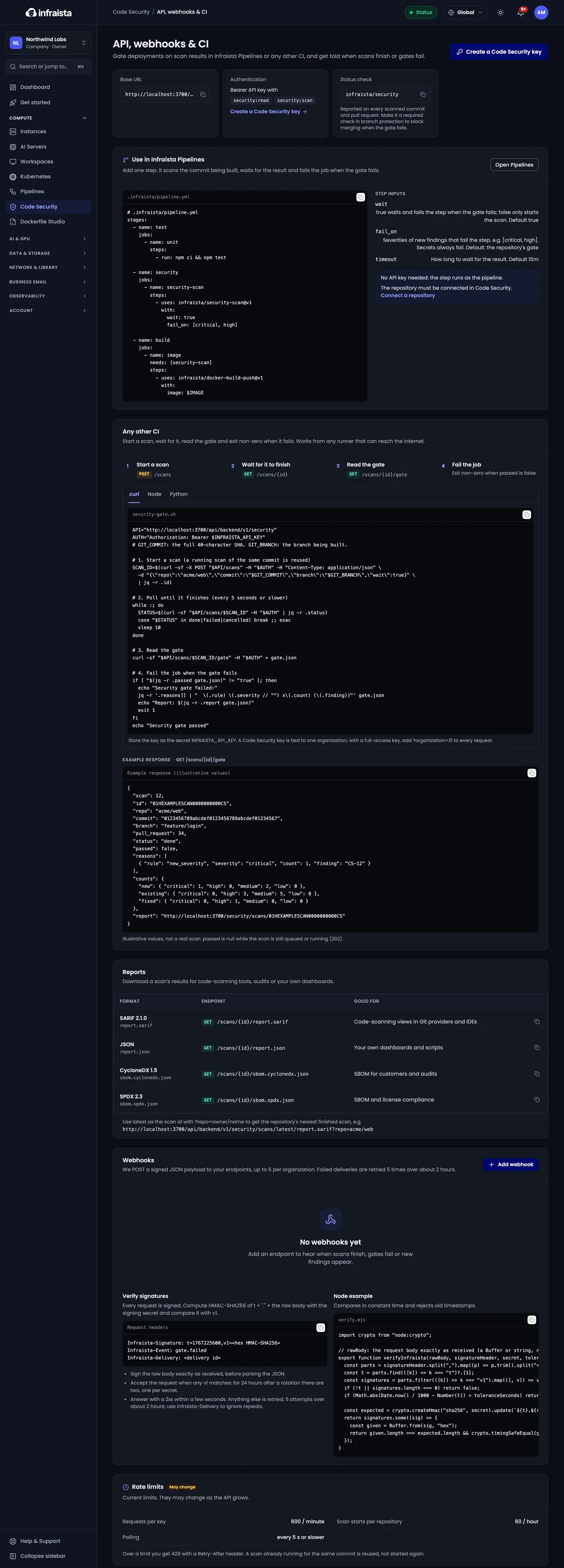
In Infraista Pipelines
Add one step. It scans the commit being built, waits for the result, and fails the job when the gate fails. No API key is needed: the step runs as the pipeline. The repository must be connected in Code Security.
- uses: infraista/security-scan@v1
  with:
    wait: true                 # default true; false only starts the scan
    fail_on: [critical, high]  # default: the repository's gate. Secrets always fail
    timeout: 15m               # how long to wait for the result
A scan of the same commit is reused, so the step doesn't scan twice.
The API
| Base URL | https://api.infraista.com/api/v1/security |
| Authentication | Authorization: Bearer <API key> |
| Rate limits | 600 requests a minute per key; 60 scan starts an hour per repository |
Create a Code Security only key under Settings › API keys (or with Create a Code Security key on this page). Pick its organization and scopes:
security:read: read scans, findings, gates, reports and SBOMs;security:scan: start scans on connected repositories (includes read).
A Code Security key works for one organization and nothing else. With a full-access key, add
?organization=<id> to every request. See API keys.
Endpoints
| Method | Path | What it does |
|---|---|---|
| POST | /scans | Start a scan: repo (owner/name), optional commit, branch, wait. Reuses a scan of the same commit. wait holds the answer up to 50 seconds; answers 202 while it's still running |
| GET | /scans/<id> | A scan |
| GET | /scans/<id>/gate | The gate result: passed, reasons, and new, existing and fixed counts |
| GET | /scans/<id>/findings | The scan's findings |
| GET | /scans/<id>/report.sarif, /report.json, /report.pdf | Reports |
| GET | /scans/<id>/sbom.cyclonedx.json, /sbom.spdx.json | The SBOM |
| GET | /repos/<owner/name>/findings | A repository's findings, with status and severity filters |
Use latest as the scan id with ?repo=owner/name to get the repository's newest finished scan.
From any other CI
Start a scan, wait for it, read the gate, and exit non-zero when it fails. Store the key as the secret
INFRAISTA_API_KEY:
API=https://api.infraista.com/api/v1/security
SCAN=$(curl -fsS -X POST "$API/scans" \
  -H "Authorization: Bearer $INFRAISTA_API_KEY" -H "Content-Type: application/json" \
  -d "{\"repo\":\"northwind/web-app\",\"commit\":\"$GIT_COMMIT\",\"wait\":true}" | jq -r '.id')

until GATE=$(curl -fsS "$API/scans/$SCAN/gate" -H "Authorization: Bearer $INFRAISTA_API_KEY") \
  && [ "$(jq -r '.passed' <<< "$GATE")" != "null" ]; do sleep 10; done

jq -e '.passed' <<< "$GATE" > /dev/null || { echo "Security gate failed"; exit 1; }
passed is null while the scan is still queued or running.
Webhooks
Infraista sends a signed JSON payload to your endpoints when something happens. Add up to 5 per organization with Add webhook: an HTTPS URL reachable from the internet, and the events.
| Event | When |
|---|---|
scan.completed | A scan finished, with counts by severity and the gate result |
gate.failed | A scan failed its gate |
finding.created | A new finding appeared on a scanned branch or pull request |
The signing secret is shown when you add the webhook; store it in your receiver. Owners and admins can reveal it again later.
Verify signatures
Each request has the headers Infraista-Signature: t=<timestamp>,v1=<signature>, Infraista-Event and
Infraista-Delivery.
- Compute HMAC-SHA256 of
t + "." + the raw bodywith the signing secret, before parsing the JSON. - Accept the request when any
v1matches. For 24 hours after you Rotate secret, there are two, one per secret. - Answer with a 2xx within a few seconds. Anything else is retried: 5 attempts over about 2 hours. Use
Infraista-Deliveryto ignore repeats.
Related
AI code review
Turn on AI code review to find flaws in your own code, such as injection and broken authorization, with explanations, suggested patches and reachability checks.
Billing and retention
How Code Security is billed per scan and for AI review tokens, where to see this month's usage, and how long scans, logs and findings are kept.