

Policies
Set what fails the Code Security gate on each branch, which licenses are allowed, your own secret patterns, how long findings can be ignored, and fix-by dates.
Code Security > Policies & gates holds the rules for every repository in your organization. Owners and admins can change them; everyone else can view them. Changes apply from the next scan.
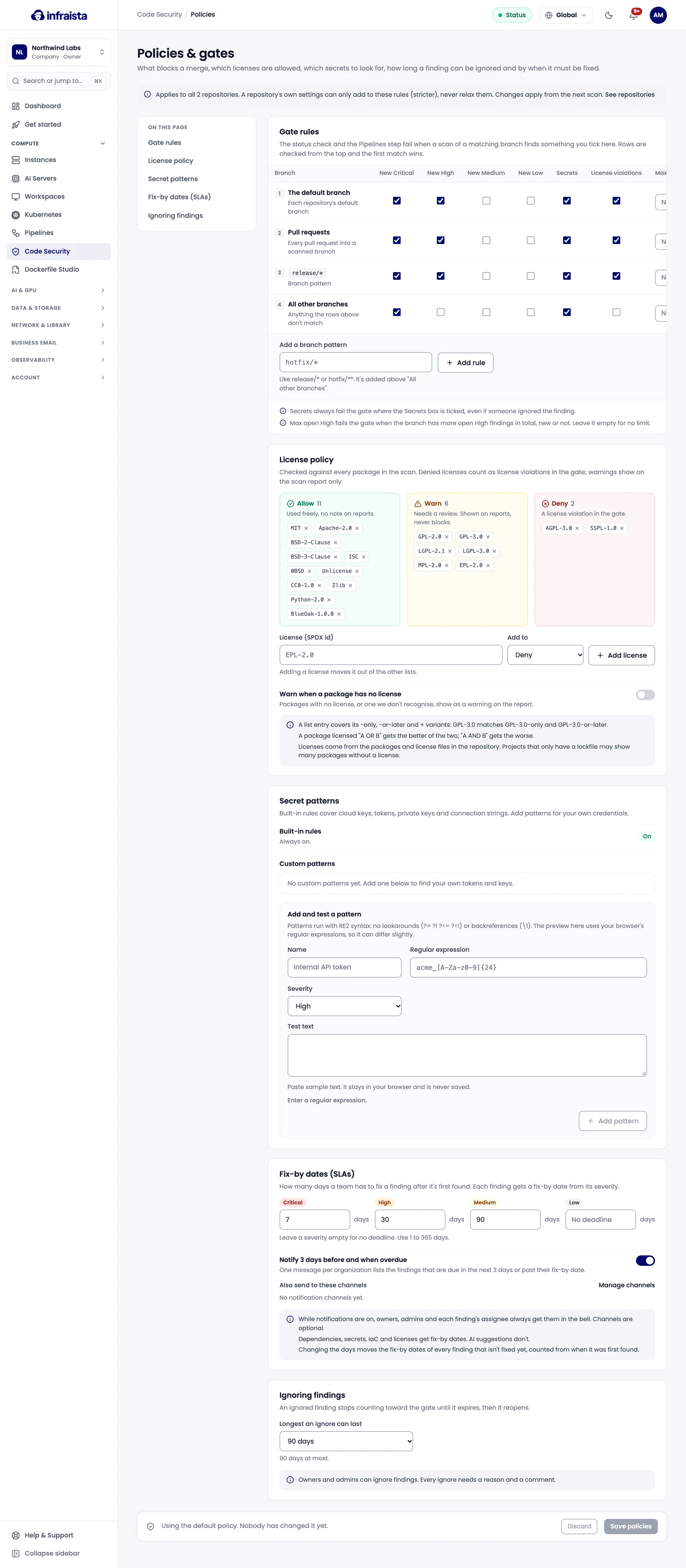
A repository's own settings can only add to these rules (stricter), never relax them.
Gate rules
Each row matches a branch, and the first row that matches wins. For each row, tick what fails the gate:
| Column | Fails the gate when |
|---|---|
| New Critical, High, Medium, Low | A scan finds new findings of that severity |
| Secrets | Any secret is found, even an ignored one |
| License violations | A new package has a denied license |
| Max open High | The branch has more open High findings in total than this, new or not. Empty means no limit |
The default rows are:
| Branch | New | Secrets | Licenses |
|---|---|---|---|
| Each repository's default branch | Critical, High | Yes | Yes |
| Every pull request into a scanned branch | Critical, High | Yes | Yes |
release/* | Critical, High | Yes | Yes |
| All other branches | Critical | Yes | No |
Use Add rule for patterns like release/* or hotfix/**; new rules go above "All other branches".
License policy
Licenses use SPDX ids (such as MIT or GPL-3.0) in three lists:
- Allow: used freely, no note on reports.
- Warn: needs a review. Shown on reports, never blocks.
- Deny: a license violation in the gate.
By default, common permissive licenses (MIT, Apache-2.0, BSD, ISC and others) are allowed, GPL, LGPL, MPL and EPL licenses warn, and AGPL-3.0 and SSPL-1.0 are denied. A package licensed "A OR B" gets the better of the two; "A AND B" gets the worse. Turn on Warn when a package has no license to flag packages with no license, or one that isn't recognized.
Licenses come from the packages and license files in the repository, so projects that only have a lockfile may show many packages without a license.
Secret patterns
Built-in rules cover cloud keys, tokens, private keys and connection strings, and are always on. Add up to 20 custom patterns for your own credentials: a name, a regular expression and a severity. Patterns use RE2 syntax (no lookarounds or backreferences). Test a pattern against sample text before adding it; the sample stays in your browser.
Ignoring findings
Longest an ignore can last: up to 90 days. Every ignore needs a reason and a comment.
Fix-by dates
How many days a team has to fix a finding after it's first found, per severity. Defaults: Critical 7 days, High 30, Medium 90, Low no deadline. Use 1 to 365 days, or leave a severity empty.
Turn on Notify 3 days before and when overdue to send one message per organization listing the findings due in the next 3 days or past their fix-by date. Owners, admins and each finding's assignee always get it in the console; add channels if you want. Changing the days moves the fix-by dates of every finding that isn't fixed yet.
Related
Work with findings
Read a finding, fix it or open a fix pull request, assign it, ignore it with a reason, track fix-by dates, and download the SBOM and reports.
AI code review
Turn on AI code review to find flaws in your own code, such as injection and broken authorization, with explanations, suggested patches and reachability checks.