

Settings and limits
Set Dockerfile Studio defaults, allowed base images, forbidden patterns, pull request options and alerts, and see how generations are billed.
Dockerfile Studio > Settings holds the defaults and rules for every Dockerfile generated in your organization.
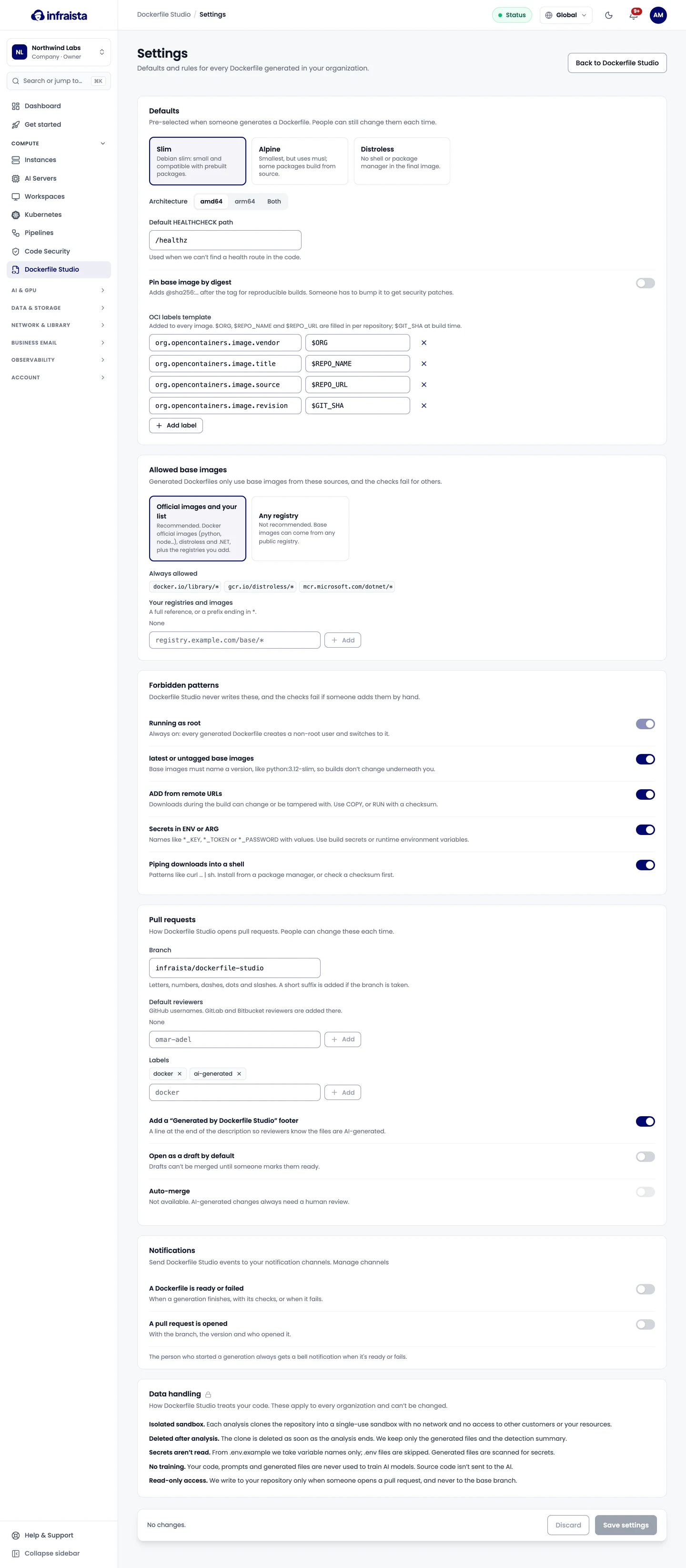
Defaults
Pre-selected options when someone generates a Dockerfile; people can still change them each time.
- Default HEALTHCHECK path: used when no health route is found in the code.
- OCI labels template: labels added to every image.
$ORG,$REPO_NAMEand$REPO_URLare filled in per repository, and$GIT_SHAat build time.
Rules for every Dockerfile
- Allowed base images: Official images and your list (recommended: Docker official images,
distroless and .NET, plus registries and images you add, such as a full reference or a prefix ending
in
*), or Any registry. Generated Dockerfiles only use allowed base images, and the checks fail for others. - Forbidden patterns: Dockerfile Studio never writes these, and the checks fail if someone adds them
by hand:
- running as root (always on);
latestor untagged base images;ADDfrom remote URLs;- secrets in
ENVorARG; - piping downloads into a shell (
curl … | sh).
Pull requests
The default Branch name (a short suffix is added if it's taken), Default reviewers, Labels, the footer, and Open as a draft by default. Auto-merge isn't available: AI-generated changes always need a human review.
Notifications
Send events to your notification channels:
- A Dockerfile is ready or failed, with its checks.
- A pull request is opened, with the branch, the version and who opened it.
The person who started a generation always gets a notification in the console when it's ready or fails.
Usage and limits
- Each organization gets a number of generations included every month. The count resets on the 1st.
- Each generation includes some refinements; after that, each AI refinement is billed. Pinning by digest uses no AI and is never billed, and a refinement that fails isn't billed.
- A generation can be refined up to 20 times.
- Downloads and pull requests don't count.
When the monthly limit is reached, choose:
- Stop new generations: new generations and refinements past the included ones are refused, and nothing is billed. Downloads and pull requests keep working.
- Keep going, billed: generations and refinements past the limit are billed on your monthly invoice, as separate lines.
The Dockerfile Studio page shows how many generations you've used this month and how many are left. See your price list in the console for current prices.
Related
Refine and open a pull request
Ask Dockerfile Studio for changes in plain language or with quick actions, edit files yourself, compare versions, and open the result as a pull request.
Dockerfile Studio API
Start Dockerfile generations, refine them, download the files and open pull requests from your own tools or CI with a Dockerfile Studio API key.