

Connect to Redis
Connect your app to an Infraista Redis database over TLS with a rediss:// URL, valkey-cli or redis-cli, and client examples for Node.js, Python and PHP.
Open the database and select Connection. It shows the Host, Port, User, Password (select Show to reveal it), the Connection URL, and command-line and client examples with your details filled in.
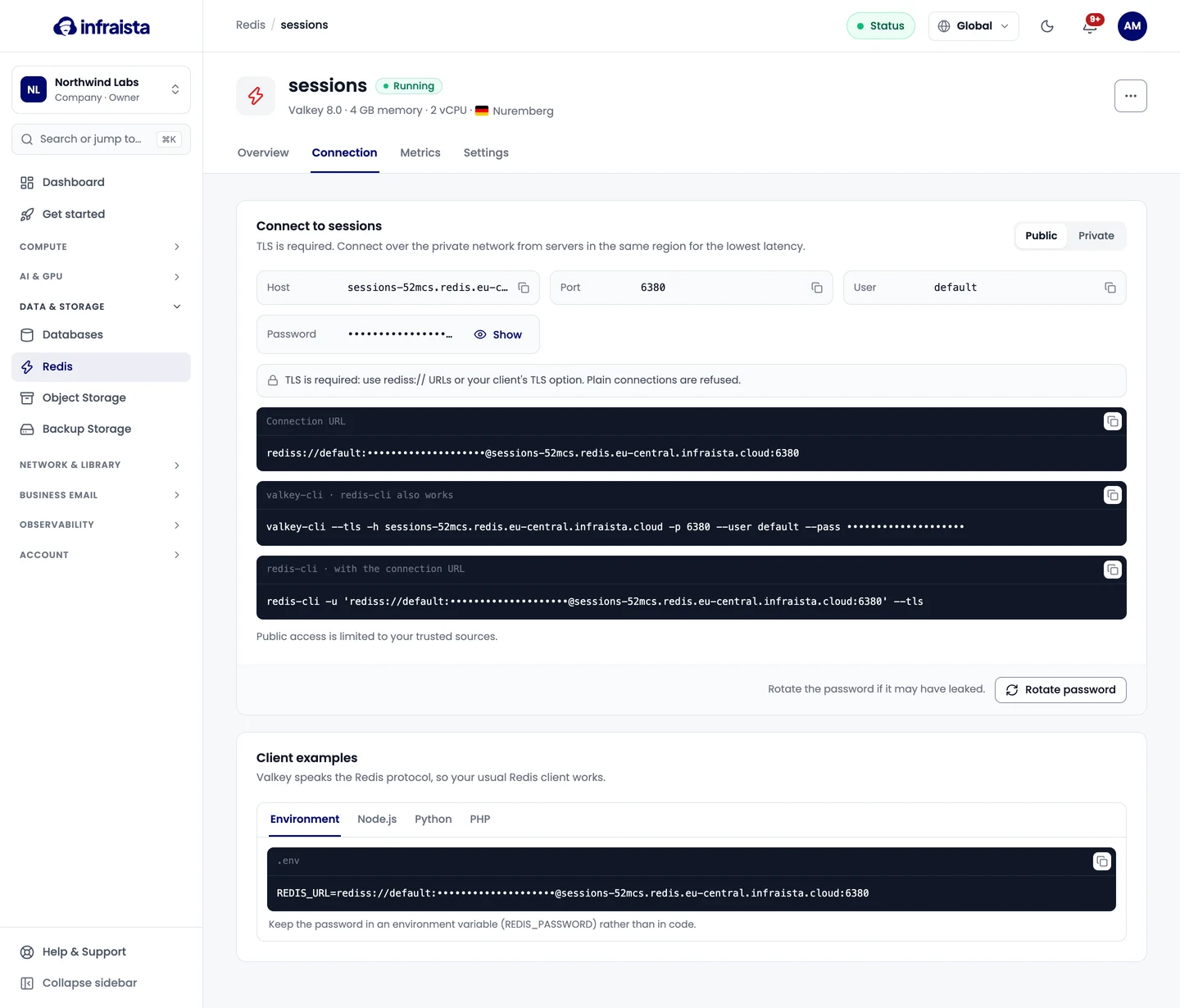
TLS is required. Use rediss:// URLs (note the double s) or your client's TLS option; plain
connections are refused. Any Redis client works.
In the examples, replace the host, port and password with yours. The user is usually default.
Connection URL
REDIS_URL=rediss://default:<password>@<host>:<port>Command line
valkey-cli --tls -h <host> -p <port> --user default --pass <password>
# or with the URL:
redis-cli -u 'rediss://default:<password>@<host>:<port>' --tls
Node.js (ioredis)
import Redis from 'ioredis'

const redis = new Redis({
  host: '<host>',
  port: <port>,
  username: 'default',
  password: process.env.REDIS_PASSWORD,
  tls: {},
})

await redis.set('hello', 'world')
Python (redis-py)
import os
import redis

r = redis.Redis(
    host="<host>",
    port=<port>,
    username="default",
    password=os.environ["REDIS_PASSWORD"],
    ssl=True,
)

r.set("hello", "world")
PHP
// Predis
$client = new Predis\Client([
    'scheme'   => 'tls',
    'host'     => '<host>',
    'port'     => <port>,
    'username' => 'default',
    'password' => getenv('REDIS_PASSWORD'),
]);

// phpredis
$redis = new Redis();
$redis->connect('tls://<host>', <port>);
$redis->auth(['default', getenv('REDIS_PASSWORD')]);
Keep the password in an environment variable or your platform's secret store, not in code.
Rotate the password
If the password may have leaked, select Rotate password and confirm. A new password is created and clients using the old one are disconnected: update your apps right after.
If something goes wrong
- The connection is reset or times out: you're connecting without TLS, or your address isn't in the trusted sources.
WRONGPASSorNOAUTH: the password changed. Copy the current one from the Connection tab.OOM command not allowed: memory is full and the eviction policy isnoeviction. Move to a bigger plan or change the policy in Settings.
Related
Create a Redis database
Create a managed Redis-compatible database in about a minute. Pick the memory size, the eviction policy, whether data persists to disk, and the region.
Trusted sources
Allow only your own servers' IP addresses to connect to a Redis database, or leave it open to any address that has the password.